PayPal Account Security Warnings Every User Should Know
- Why PayPal Account Security Warnings Matter
- Common Types of PayPal Account Security Alerts
- Unusual Login Activity
- Unauthorized Transaction Warnings
- Phishing Attempt Warnings
- Account Limitation Notices
- Suspicious Device or Browser Alerts
- How to Respond to a PayPal Account Security Warning
- Recognizing Fake PayPal Emails
- Protecting Your Business Account
- Long Term Habits for a Secure PayPal Account
- Final Thoughts
- Frequently Asked Questions
- What does a PayPal account security warning mean?
- Is every PayPal security email genuine?
- What should I do if I receive an unauthorized transaction warning?
- Can my PayPal account be limited without warning?
- How can I tell if a PayPal login alert is real?
- Does two factor authentication stop all PayPal security warnings?
PayPal has become one of the most trusted names in online payments, powering transactions for millions of individuals and businesses across the world. That same popularity makes it a constant target for scammers, phishing operators, and fraudsters looking to exploit unsuspecting users. Understanding the common PayPal account security warnings the platform issues, and knowing how to respond to them, can be the difference between a safe transaction and a compromised account.
This guide walks through every major type of PayPal account security warning, explains why these alerts appear, and offers practical steps for protecting personal and business accounts from fraud. Whether you use PayPal occasionally for online shopping or rely on it daily for business transactions, recognizing a PayPal account security warning early can save you significant time, money, and stress.
Why PayPal Account Security Warnings Matter
PayPal uses automated systems and manual reviews to flag unusual activity on an account. These warnings are not random. They are triggered by patterns that closely resemble known fraud tactics, such as logins from unfamiliar locations, sudden changes in spending behavior, or attempts to access an account using outdated credentials. Ignoring these alerts can leave both buyers and sellers exposed to significant financial and identity risks.
Every PayPal account security warning exists to protect the account holder from losing money or having personal data exposed. Treating these notifications as background noise rather than genuine alerts is one of the most common mistakes users make, and it is often the reason accounts end up compromised in the first place.
Common Types of PayPal Account Security Alerts
Unusual Login Activity
Unusual login activity is one of the most frequent alerts users receive. If PayPal detects a sign in attempt from a new device, browser, or country, it will typically send an email or in app notification asking the user to confirm whether the activity was authorized. Responding quickly to this alert, and changing the password if the activity was not recognized, is essential. Failing to act on this type of PayPal account security warning within a short window can give an attacker enough time to change account details or initiate a transfer.
Unauthorized Transaction Warnings
Unauthorized transaction warnings appear when PayPal identifies a payment that does not match a user’s typical spending pattern. This might include a large purchase, a transfer to an unfamiliar account, or repeated small transactions in a short period. PayPal often places a temporary hold on such transactions while it verifies the account owner’s identity. Users who receive this alert should log in directly through the official app or website and review the transaction history line by line before taking any further action.
Phishing Attempt Warnings
Phishing attempt warnings are issued when PayPal becomes aware of fraudulent emails or websites impersonating its brand. These messages often ask users to click a link and enter their login details or financial information. PayPal never asks for sensitive information through unsolicited email, so any message requesting this should be treated as suspicious and reported immediately. Phishing remains one of the leading causes behind compromised accounts, and understanding this particular PayPal account security warning can prevent the vast majority of takeover attempts.
Account Limitation Notices
Account limitation notices are sent when PayPal restricts certain account functions, such as sending or withdrawing money, until additional verification is completed. This usually happens when the platform detects inconsistencies in account information or suspects a possible security breach. In most cases, resolving a limitation requires submitting identification documents or confirming recent activity through the resolution center inside the account dashboard.
Suspicious Device or Browser Alerts
PayPal also monitors the devices and browsers used to access an account. When a login attempt comes from a device that has never been used before, or from a browser configuration that looks unusual, the platform may send a warning asking the user to verify the device before granting full access. This layer of protection adds friction for attackers even if they already have a stolen password.
How to Respond to a PayPal Account Security Warning
The safest way to respond to any PayPal alert is to log in directly through the official PayPal website or app rather than clicking on links provided in an email or text message. This avoids the risk of landing on a fake login page designed to steal credentials. Once logged in, users can review their account activity, confirm or dispute transactions, and update their security settings if needed.
Enabling two factor authentication adds an important layer of protection, requiring a one time code in addition to a password before access is granted. Regularly updating passwords, avoiding the reuse of the same password across multiple platforms, and monitoring linked bank accounts or cards for unfamiliar charges are additional habits that reduce the risk of account compromise. Setting up email and text alerts for every transaction also means that any unauthorized activity is noticed within minutes rather than days.
Recognizing Fake PayPal Emails
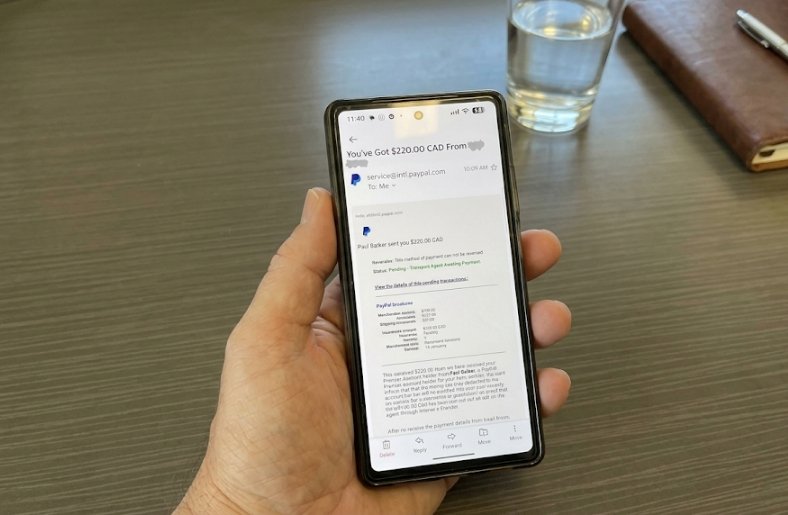
Fraudulent emails often mimic PayPal’s branding closely, but they usually contain small inconsistencies. Generic greetings instead of a user’s actual name, urgent language demanding immediate action, misspelled domain names in the sender address, and links that redirect to unfamiliar websites are all common red flags. Hovering over a link before clicking, without actually clicking it, often reveals a mismatched or suspicious web address.
Genuine PayPal account security warnings will always direct users to log in through the official app or paypal.com directly, rather than through an embedded link that bypasses the normal login process. When in doubt, closing the email entirely and opening a browser to visit PayPal manually is the safest course of action.
Protecting Your Business Account
Businesses that rely on PayPal for daily transactions face additional risks, since a compromised account can disrupt cash flow and damage customer trust. Assigning limited access permissions to employees who manage the account, reviewing transaction histories regularly, and setting up alerts for large or unusual payments all help maintain a secure business environment.
Business owners should also train staff to recognize a PayPal account security warning when it appears, since employees who handle payments daily are often the first to encounter phishing attempts or suspicious login prompts. A short internal policy on how to verify and escalate these alerts can prevent costly mistakes.
Long Term Habits for a Secure PayPal Account
Beyond reacting to individual alerts, building consistent security habits reduces the overall chance of ever seeing a serious PayPal account security warning. This includes updating the account password every few months, removing old or unused linked bank accounts and cards, reviewing connected apps and third party permissions periodically, and keeping the registered email address and phone number current so that alerts are never missed.
Users who travel frequently should also expect to see more login verification requests, since PayPal treats new locations as a higher risk factor. Confirming travel plans in advance through the account settings, where available, can reduce unnecessary friction while still keeping the account protected.
Final Thoughts
PayPal account security warnings exist to protect users from a wide range of fraud attempts, and taking them seriously is one of the simplest ways to safeguard both money and personal information. Staying alert to unusual login notifications, verifying transactions through official channels, and recognizing the signs of phishing attempts can help users avoid the most common threats circulating online today. Building steady security habits, rather than reacting only when a warning appears, is ultimately the most reliable way to keep a PayPal account safe over the long term.
Frequently Asked Questions
What does a PayPal account security warning mean?
A PayPal account security warning is an alert generated when the platform detects activity that does not match a user’s normal behavior, such as a new device login, an unusual transaction, or a suspected phishing attempt. It is designed to prompt the account holder to verify their identity or confirm the activity in question.
Is every PayPal security email genuine?
No. Scammers frequently create fake emails that closely resemble official PayPal account security warnings in order to trick users into revealing login credentials. The safest approach is to avoid clicking any link inside the email and instead log in directly through the official app or website to check for real alerts.
What should I do if I receive an unauthorized transaction warning?
Log in directly through the official PayPal app or website, review the transaction in question, and dispute it immediately if it was not authorized. Changing the account password and enabling two factor authentication afterward helps prevent further unauthorized access.
Can my PayPal account be limited without warning?
PayPal typically sends a notification before or at the time an account limitation is applied, explaining the reason and the steps needed to restore full access. This type of PayPal account security warning is usually visible both in the account dashboard and through email.
How can I tell if a PayPal login alert is real?
Genuine alerts will never ask for a password, card number, or personal identification directly inside an email. They will instead direct the user to log in through the official channel to review and confirm the activity. Checking the sender’s email domain carefully is also a reliable way to spot fake alerts.
Does two factor authentication stop all PayPal security warnings?
Two factor authentication significantly reduces the risk of unauthorized access, but it does not eliminate every type of warning. Users may still receive alerts related to unusual transactions or account information changes, since these are triggered by activity patterns rather than login security alone.
